Development
We welcome contributions to XRADIO from the radio astronomy community and beyond! If you want to participate in the development of the library, please join us on GitHub - we welcome issue reports and pull requests!
Setting up a Development Environment
Install the conda environment manager from miniforge and create a clean, self-contained runtime where XRADIO and all its dependencies can be installed:
conda create --name xradio python=3.13 --no-default-packages
conda activate xradio
📝 On macOS, if one wants to use the functions to convert MSv2=>MSv4, it is required to pre-install
python-casacore. This can be done usingconda install -c conda-forge python-casacore. See more alternatives below.
Clone XRADIO repository, move into directory and install:
git clone https://github.com/casangi/xradio.git
cd xradio
pip install -e ".[all]"
The -e (or --editable) is a convenient option that ensures that
the installation location is the same as the cloned repository (using
pip list should show this), so that you can directly modify the
cloned repo and have those modifications reflect directly in the
development environment. The [all] ensures that all dependencies so
that you can run tests, the interactive Jupyter notebooks and build the
documentation (the dependencies can be found in the
pyproject.toml).
Building documentation
To build the documentation navigate to the docs folder, create a folder name build and run sphix:
cd docs
mkdir build
sphinx-build source build -v
Submitting Code
Any code you submit is under the BSDv3 license and you will have to agree with our contributor license agreement that protects you and the XRADIO project from liability.
Create an issue on github outlining what you would to contribute XRADIO GitHub repository.
Once there is agreement on the scope of the contribution you can create a branch on github or in you clones repository:
git checkout -b feature-or-fix-name
(If you create the branch in your cloned repository remember to link it to the GitHub issue).
Make your code changes and add unit tests.
Run the tests locally using pytest.
After running Black add, commit and push your code changes to the GitHub branch:
git add -u :/ #This will add all changed files.
git commit -m 'A summary description of your changes.'
git pull origin main #Make sure you have all the latest changes in main.
git push
If you are making many changes you can break up the work into multiple commits.
If tests pass and you are satisfied open a pull request in GitHub. This will be reviewed by a member of the XRADIO team.
Code Organization
Each data schema supported by XRADIO is organized into its own
sub-package, with a shared _utils directory that contains code
common to multiple sub-packages as shown in Figure 1. The current
architecture includes the measurement_set and image sub-packages
(see the list of planned XRADIO
schemas).
The user-facing API is implemented in the .py files located at the
top level of each sub-package directory, while private functions are
housed in a dedicated sub-directory, such as _measurement_set. This
sub-directory contains folders for each supported storage backend, as
well as a _utils folder for common functions used across backends.
For instance, in the measurement_set sub-package, XRADIO currently
supports a zarr-based backend. Additionally, we offer limited
support for casacore table Measurement Set v2 (MS v2), through a
conversion function that allows users to convert data from Measurement
Set v2 (stored in Casacore tables) to Measurement Set v4 (stored using
zarr). The conversion function for MS v2 requires the optional
dependency python-casacore, or alternatively CASA’s casatools
backend (see casatools I/O
backend).
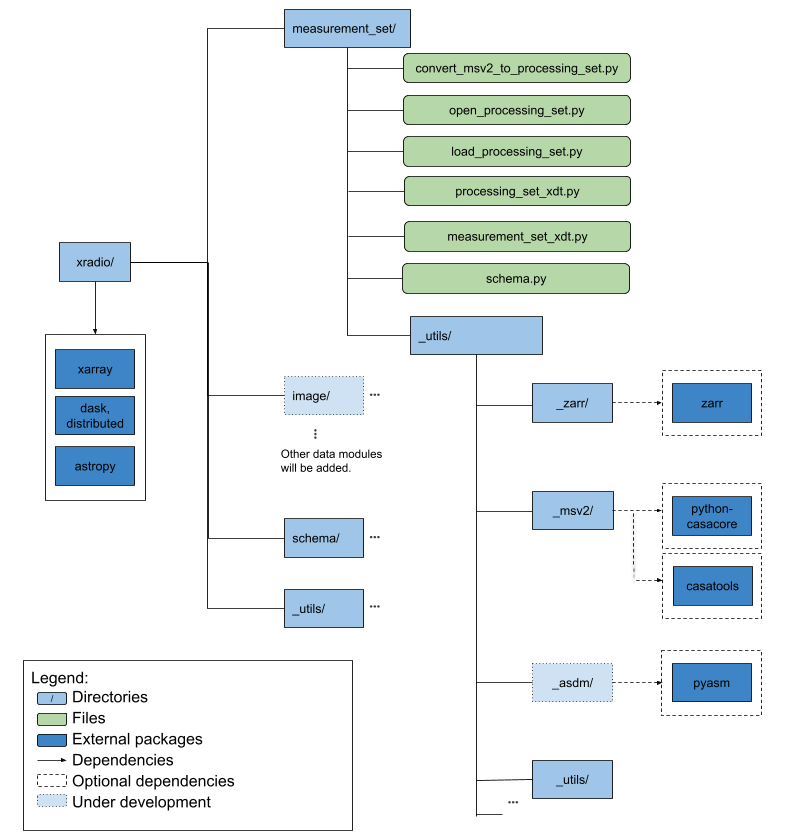
Figure 1: XRADIO Architecture.
Dependencies
XRADIO is built using the following core packages:
xarray: Provides the a framework of labelled multi-dimensional arrays for defining and implementing data schemas.daskanddistributed: Enable parallel execution for handling large datasets efficiently.zarr(zarr specification, v2 and v3): Used as a storage backend for scalable, chunked and compressed n-dimensional data.Optionally, python-casacore (Casacore Table Data System (CTDS) File Formats): Used to convert data from MS v2 to MS v4 in Zarr format, with ongoing development toward a lightweight, pure Python replacement. Alternatively, the casatools I/O backend can be used.
Optionally, pyasdm (under development): A Python-based storage backend in progress, designed for accessing ASDM (Astronomy Science Data Model) data.
Schema Conventions
All data is organized into:
Xarray DataArrays: a multi-dimensional labeled n-dimensional array
Xarray Datasets: a container of multiple data arrays, with shared axes and coordinates.
Xarray DataTrees: a hierarchy of multiple related datasets
When creating an Xarray-based schema, we use the following conventions:
Coordinates: Values used to label plots and index data (e.g., numbers or strings). Data arrays that are coordinates are always eagerly loaded under the assumption that it will be required for indexing operations. Coordinate names are always in lowercase
snake_case.Data Variables: Numerical values used for processing and plotting. Data is lazily loaded if possible, as it might be too large to load speculatively. Data variable names always use uppercase
SNAKE_CASE.
For instance, in the Measurement Set v4
schema, antenna_name and
frequency are coordinates, while VISIBILITY data are data
variables.
Processing Sets are XRADIO implementation of xarray DataTree objects
that consist of a collection of nodes that represent
Measurement Sets as xarray DataTree objects. Each
Measurement Set is a DataTree that groups a collection of
xarray Datasets. Among these datasets are the correlated dataset
(either Spectrum or Visibilities dataset), the antenna
dataset, the field_and_source dataset, etc.
Lazy and Eager Functions
Functions prefixed with
open_perform lazy execution, meaning only metadata—such as coordinates and attributes—are loaded into memory. Data variables, though not immediately loaded, are represented as lazy Dask Arrays. These arrays only load data into memory when you explicitly call the.compute(),.load()or related methods.Functions prefixed with
load_perform eager execution, loading all data into memory immediately. These functions can be integrated with dask.delayed for more flexible execution.
Coding Conventions
Formatting: All code should be formatted using Black. A GitHub Action will trigger on every push and pull request to check if the code has been correctly formatted.
Naming Conventions:
Use descriptive names. For example, use
image_sizeinstead ofimsize.Function names and variables should follow snake_case. Examples:
my_function,my_variable.Class names should follow CamelCase. Example:
MyClass.
Imports: Avoid relative imports; always use absolute imports to maintain clarity.
Docstrings: All functions and classes should include NumPy-style docstrings. For guidelines, refer to the NumPy Documentation Guide.
Compute-Intensive Code: Ensure that compute-intensive code is vectorized for performance. If vectorization is not feasible, consider using Numba. Use performance testing to verify that optimizations are effective.
Testing: Write unit tests for all major functions and classes using pytest. The folder structure of
xradio/tests/unitshould mirror the source code structure.Error Handling & Logging: Use the toolviper logger for consistent logging.